Posts

Physics engine series

A quick post to summarize the posts I’ve already made on physics engines. The series are not yet done. I will cover the broad and narrow phase algorithms when I get around to write about them. Part 1 – The very basics of physics engines. What is the responsibility of a physics engine and how are they defined. Part 2 – A quick overview of how a physics engine work. Collision detection, physics response and their submechanisms. Part 3 – A look into the physics response part of a physics engine. How do we calculate velocity and how do we apply it using numerical integration.
Performance tips and tricks series

In the past I posted 4 blogs posts with ways to optimize your applications using keywords, compiler tricks and approximations. Here is a quick overview of the blog posts: Part 1 – Common sense in application development. Use constants and loop manipulation. Part 2 – Most commonly used keywords in C#: sealed, static, struct, ref, out and unsafe Part 3 – Information about method inlining. Notes on virtual calls, struct arguments and exception handling. Short introduction to loop unrolling. Part 4 – Boxing and unboxing, more on exception handling and string operations Hopefully I will get the time to write some Xbox360 specific optimizations in the near future. I’m busy with the development of Farseer Physics Engine 3.0 at the moment, so it might take some time.

My Xbox 360 nightmares

Once upon a time an open source software developer wrote a physics engine for the .net platform. (Let us call him me !) Because of many requests from his users, he targeted Xbox360 as one of the supported platforms. The many users of his free physics engine felt generous and donated a Xbox360 so that he could optimize the physics engine for that platform. Overjoyed by the offer, he accepted and could not wait to see what kind of machine the Xbox360 really was. Nightmare number 1 After paying for a cheap Xbox360 Arcade on  the Internet he waited almost a month before realizing something was wrong. After 5 emails to the retailer and several weeks later, the order was finally canceled and he went on another journey to find a cheap retailer that would provide him with a brand new Xbox360. Nightmare number 2 After his first experience he checked out all the possible references to the new shop as he possible could. Customer comments, google ratings and even the famous E-Ma...

Facebook style auto-complete textbox in ASP.net

Image
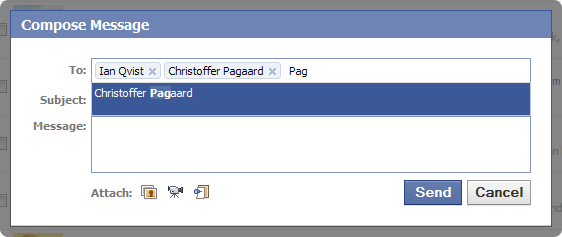
You might have seen the crispy AJAX enabled auto-complete list when entering friends into a textbox. I was especially intrigued by the “Compose Message – To:” textbox. You enter a part of a name and almost instantly a list of names popup. Adding a name is as simple as selecting it from the list and it gets added to the textbox. I started to identify the different parts of this functionality: Labels inside textbox Auto-completion on entering text Growable textbox size Highlighting of results Close button on labels Many more… It looked like a daunting task, so I decided to search for an already made solution instead of making one myself. I came across an Ajax Control Toolkit issue that requested this functionality and even a jQuery plugin mentioned on Stack Overflow . Seemed like a lot of people mentioned this functionality, but nothing really appealed to me until I found TextboxList on DevThought.com . It immediately caught my attention since it had a...

Pseudo orientation in Farseer Physics Engine

Image
Farseer Physics Engine does not know about its object’s orientation. It has no clue about what is up and what is down. It only needs to know where other objects are in the physics world – nothing else. Sometimes it is good to know what is left, right, top and bottom. In this blog post I will describe a way of determining the side on which an object is hit, no matter the rotation of the object. Let’s take a simple box as an example: We can easily determine what is left, right, top and bottom on that box. We do it all the time in the real world. In geometry though, we need to calculate it. Imagine a circle inside the box. This circle is made up of 360 degrees or 2*π in radians. We can now use this circle to find out where the box was hit (left, right, top, bottom) by determining the angle at which the other object hit. A good reference to how radians are laid out on a circle can be found on Wikipedia . Now we end up with something like this: Now we need to determine the...

2D Physics Engine Tutorial – Part 3

Image
In part 2 we had a look at the collision detection part of physics engines. In this post we take a look at the collision response part and see what kind of mechanisms it involves. Movement Physics engines have the ability to move objects around both in linear and angular motion. It is done using linear and angular velocity (with speed and acceleration ), force and integrators . Velocity Velocity is a vector that describes the rate of change in position; the magnitude of the vector is the speed and the direction of the vector is the direction in which the speed is applied. Velocity definition v is the velocity vector, Δx is the displacement and Δt is the change in time. Force Force exist in many ways, but generally it is the agent that cause a body to change in motion or make a mass change its velocity. Force has both magnitude and direction and thus it can be expressed as a vector. Newton’s second law F is the force vector, m is the ...

User managed games and automatic server checks

Image
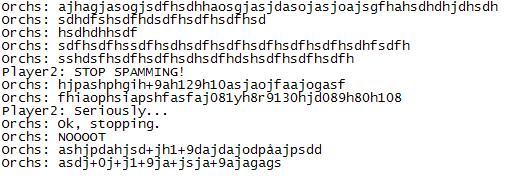
Let me ask you one thing: Why does network-enabled games utilize user controlled user management (like kick voting menus)? The answer is really simply: User management User management Network-enabled games need some kind of online-police that can control the game and its users. Imagine a rouge user that joins an online game just to create havoc and chaos. I have met several examples myself in my past as both server admin, game moderator and as a player. They all have one thing in common: Make people angry and laugh at their inability to act on it. Let us have a look at the different types of bad guys: The microphone guy The first case is a user that connects his microphone, turns up his music (Usually obnoxious repeating music designed to drive people crazy) and press the “talk” button. This can continue the whole game and it makes people furious. Players start to blame the game and game moderators that they are not doing anything about it, but fact is that they are powerless...